Linear Lens
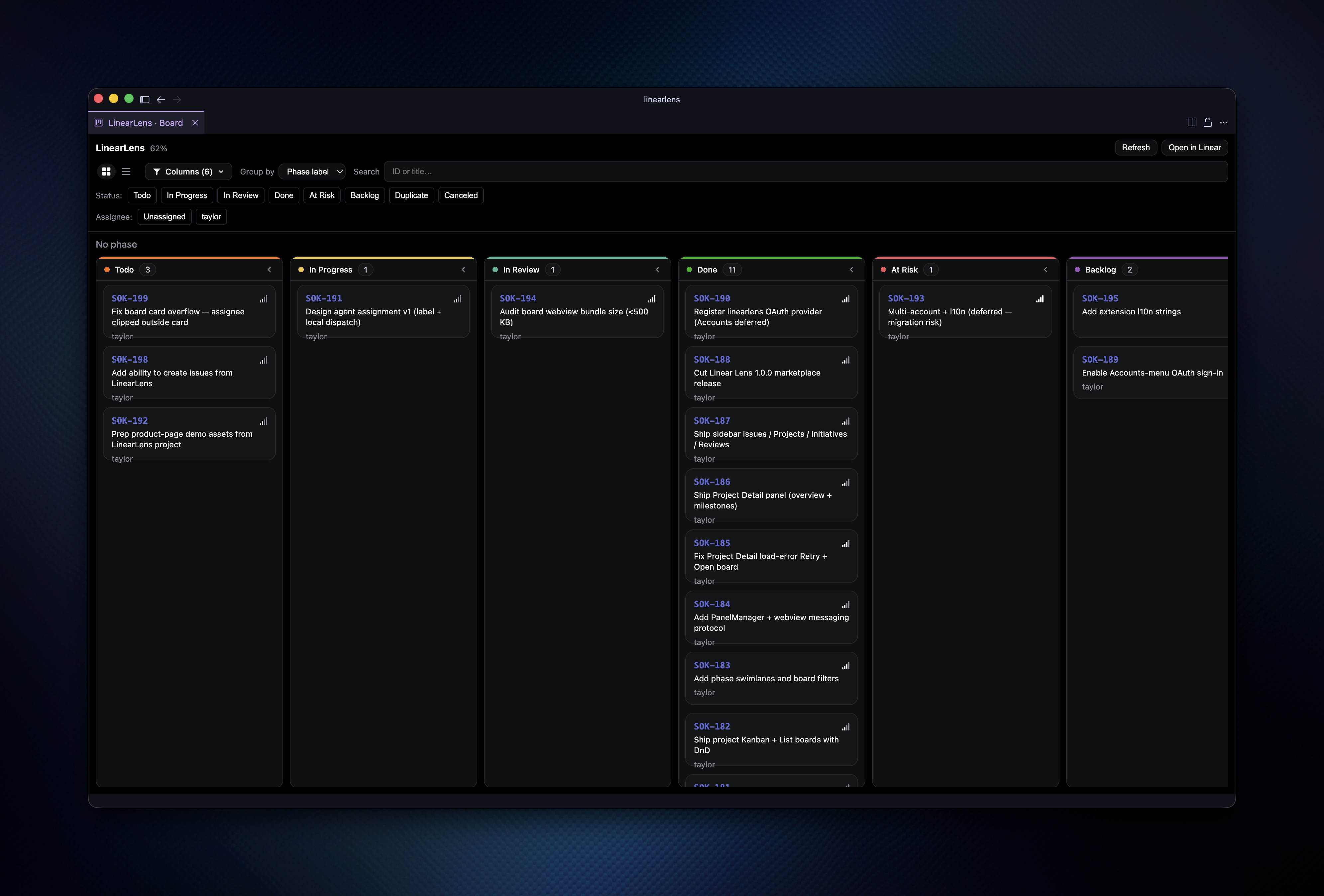
Linear in your IDE. Browse Issues, Projects, Initiatives, and Reviews in a VS Code / Cursor sidebar, then open issue detail, project detail, and Kanban/List boards without leaving the editor.
- { key: 'duration' }
- 1 month
- { key: 'role' }
- Creator & maintainer
- { key: 'atmosphere' }
- Open source & community-minded
- { key: 'technology' }
- TypeScript, VS Code API, React, Vite, esbuild, Linear SDK
Linear Lens: Linear in your IDE, not in another tab
Linear Lens is a VS Code and Cursor extension that puts your Linear workspace where the work already happens: the editor. Browse Issues, Projects, Initiatives, and Reviews in a dedicated sidebar, then open Issue Detail, Project Detail, and Kanban/List boards without bouncing to a browser tab every time a status flips.
Source code and releases live on GitHub: github.com/taylorsegell/linearlens.
Challenge
Context switching is the tax nobody budgets for. You are deep in a branch, a Linear comment lands, and suddenly you are juggling a second window just to edit a title or drag a card. The goal for Linear Lens was a practical in-IDE surface that:
- Keeps triage in the activity bar so Issues, Projects, Initiatives, and Reviews stay one click away
- Lets you edit the fields that matter (title, description, status, priority, assignee, labels) without leaving the editor
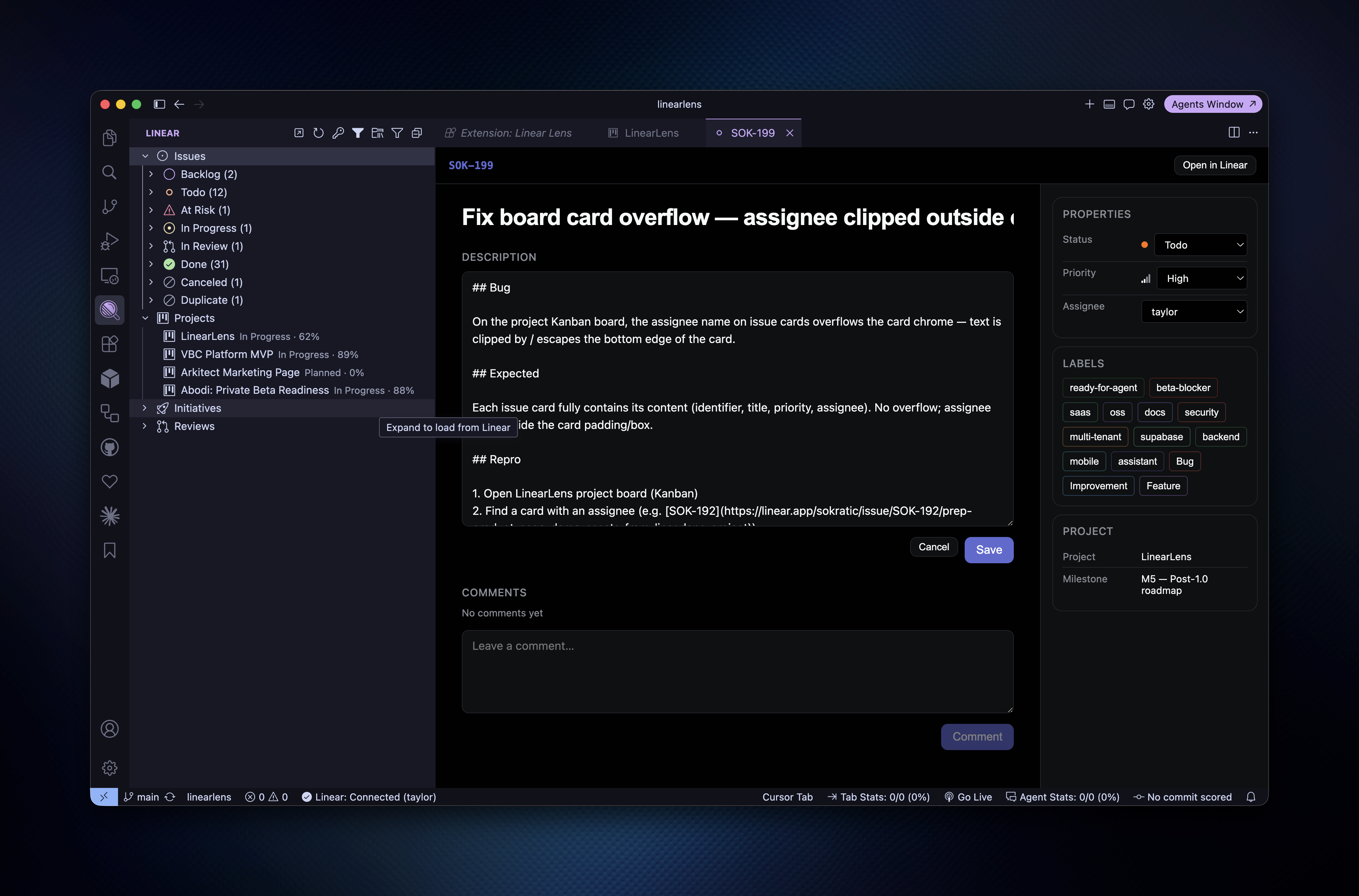
- Ships real project boards (Kanban and List) with drag-and-drop status, filters, and phase swimlanes
- Ships auth that works on day one (Personal API key), while leaving a clean OAuth path for later
- Stays fork-friendly: TypeScript, familiar tooling, MIT, no mystery sauce
Solution
Linear Lens is a sidebar + panels product, not a thin bookmark to linear.app:
- Sidebar first: Issues (filterable by status and project), Projects with progress, Initiatives, and Reviews in one Linear activity bar container
- Issue Detail: Markdown description editing, comments, clickable sub-issues, and a properties rail for status, priority, assignee, labels, project, and milestone
- Project Detail: overview, milestones, recent issues, and an editable description so project narrative lives next to the code
- Boards that behave: Kanban and List views, DnD status updates, status/assignee filters, phase swimlanes via a configurable label prefix, and virtualized scrolling for larger boards
- Auth pragmatism: Personal API key powers the UI for 1.0.0; the
linearlensauthentication provider is registered so Accounts-menu OAuth can land without a rename migration later
Implementation
How the pieces fit together:
- Extension host:
extension.tswires commands, the sidebar tree, and aPanelManagerthat opens Issue, Project, and Board webview panels with a thin messaging protocol. - Linear data layer:
@linear/sdkplus focused GraphQL calls fetch issues, projects, and board payloads; mutations push status and field edits back to Linear. - Webview UI: React 19, Vite, and Linear-inspired tokens render Issue Detail, Project Detail, and boards;
@dnd-kithandles drag-and-drop,react-windowkeeps long columns honest. - Board UX: column filters, assignee chips, search, and optional phase grouping (
linear.board.phaseLabelPrefix, defaultphase-) so swimlanes match how the team already labels work. - Auth storage: API key for day-to-day use; OAuth internals (refresh, revoke, scope filtering) sit ready under provider id
linearlenswithout colliding with other Linear extensions. - Ship path: esbuild bundles the host to
dist/main.js, Vite buildsdist/webview/, Vitest covers oauth/storage helpers, andvscepackages marketplace releases asarkitect.linearlens.
Key features
Sidebar triage
- Issues grouped by status with counts, plus project and status filters you can clear in one command
- Projects list with progress; Initiatives and Reviews sit alongside so the activity bar is the map, not a dead icon
Issue and project panels
- Edit title, description, status, priority, assignee, and labels from the IDE
- Comment without opening the browser; open sub-issues as their own panels
- Project Detail for overview, milestones, recent issues, and description edits
Kanban and List boards
- Drag cards across status columns; List mode when you want density over columns
- Filter by status and assignee; group by phase label when the board needs swimlanes
- Virtualized scrolling so a busy Done column does not melt the webview
Practical auth and packaging
- Linear: Set API Key gets you connected in minutes (Settings → API on Linear)
- Marketplace id
arkitect.linearlens; safe alongside other Linear extensions because provider ids differ - MIT, Yarn, TypeScript strict, CI on typecheck / test / esbuild
Results
Linear Lens turns Linear from a tab you visit into a surface that lives next to the diff. Maintainers and teammates get:
- Fewer context switches when updating status, writing a comment, or checking project progress mid-PR
- Boards in the editor for the “where is this, really?” moment without leaving Cursor or VS Code
- A reusable OSS baseline for IDE + Linear workflows: sidebar, panels, boards, and a deferred OAuth path that does not paint you into a rename corner
Try it
Repository: clone or fork Linear Lens on GitHub, run yarn install && yarn build, then press F5 (Run Extension) and connect with Linear: Set API Key.
Marketplace: install arkitect.linearlens in VS Code or Cursor (engine 1.96.0+), open the Linear activity bar icon, paste a Personal API key, and open an issue or Linear: Open Project Board.
Worth poking once you are connected:
- Filter Issues by status or project from the sidebar title menu
- Open a project board, toggle Kanban vs List, and drag a card across columns
- Edit an issue description and properties, then hit Open in Linear when you still want the full web app
Linear Lens is meant to stay maintainer-owned: your key, your workspace, your fork. The scaffolding (sidebar, panels, boards) is shared in the open so the next person can ship the missing piece without rebuilding the plumbing.
Questions about this work — or a similar problem?